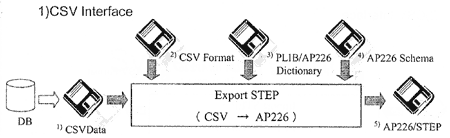
◆ Legacy format is expressed by CSV form.
◆ 1)CSV Data as input is allowed a free form. So, 2)CSV Format Data informs it separately. 2)CSV Format is connected with Data category of CSV file and property-bsu.
◆ Read Data refers to 03PLIB/AP226 Dictionary and map into 4)AP226 Schema.
◆ In this system, the following functions of Express Data Manager by EPM are used.
・Read/Write STEP file
・Express-X
3. Import STEP
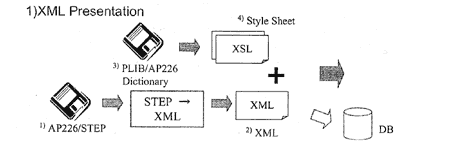
◆ Refer to 3)PLIB/AP226 Dictionary and prepare 4)Style Sheet(.xsl).
Making plurals for every purposes. (by manual working)
◆ 1)AP266/STEP file, as input, it makes 2)XML automatically.
To make this management easy, a function of Express-X is used.
◆ Attached 4)Style Sheet to 2)XML file that is made out automatically and express after calling by IE.
◆ In this system, the following functions of Express Data Manager by EPM are used.
・Read/Write STEP file
・Express-X